

As of November 13, 2026, everyone in your workspace shares one pool of
credits. If you are on a legacy plan without this enabled and would like to
migrate to a shared credit pool, please
chat with us or email
support@magicpatterns.com.
Credits
Credits are used when the AI generates or changes your design. Bigger tasks use more credits. Manual edits, exports, sharing, and “Fix with AI” don’t use credits.How many credits will I use?
Here’s what a typical design uses, based on how many versions it goes through:
These numbers are based on Claude Opus 5.5. Other models use different amounts.
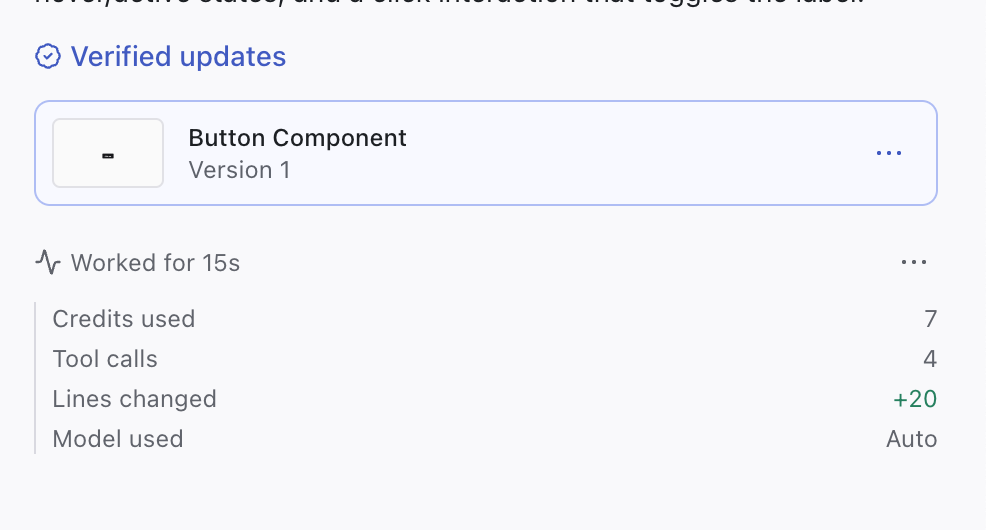
After each response, the bottom of the chat shows how many credits it used and which model ran it.
Refresh and rollover
- Monthly plans: credits refresh when your monthly payment goes through.
- Annual plans: credits refresh at 2:00 AM UTC the day after your billing date each month.
- Rollover: unused credits roll over to the next month, then expire one month later.
Shared credit pool
How big is the pool?
Each workspace has one subscription. When you buy a plan, you choose how many credits the workspace gets each month, and that’s the size of your pool.Who uses the pool?
Everyone in the workspace, including people who join later. If you’re in more than one workspace, credits come from the workspace you’re working in.Which credits are used first
Each generation draws from these, in order, moving on only when the one before is used up:- The workspace’s rollover credits
- The workspace’s monthly credits
- Your individual user credit balance (e.g. monthly free credits)
- The workspace’s on-demand usage, if an admin has turned it on
- Your own personal on-demand usage, if the workspace hasn’t turned on on-demand usage
Changing the size of your pool
Change your plan or credit amount to change your pool. Upgrades take effect straight away, and downgrades start from your next billing cycle. See Change or cancel your subscription.When the pool runs out
When the pool runs out, it runs out for everyone in the workspace. Each person then uses their individual user credit balance (e.g. monthly free credits), if they have one. Admins can turn on on-demand usage so the team can keep working, billed to the workspace. If the workspace hasn’t turned on on-demand usage, you can turn on personal on-demand usage so you’re not blocked waiting on your billing admin. If the workspace’s on-demand usage hits its budget limit, an admin has to raise the limit, or you wait for the next billing cycle.Common questions
How do I get more credits?
How do I get more credits?
Upgrade to a higher plan or credit amount, or turn on on-demand usage to keep generating after your pool runs out. See Change or cancel your subscription.
What uses credits in Magic Patterns?
What uses credits in Magic Patterns?
Credits are used when the AI generates or changes your design. Manual edits, exports, sharing, and “Fix with AI” don’t use credits.
When do my credits reset?
When do my credits reset?
On monthly plans, credits refresh when your monthly payment goes through. On annual plans, they refresh at 2:00 AM UTC the day after your billing date each month. See Refresh and rollover.
How do I see how many credits a prompt used?
How do I see how many credits a prompt used?
After each response, the bottom of the chat shows how many credits it used and which model ran it.
What happens when my workspace runs out of credits?
What happens when my workspace runs out of credits?
Each person falls back to their individual user credit balance (e.g. monthly free credits), then to the workspace’s on-demand usage if an admin has turned it on. If the workspace hasn’t turned on on-demand usage, you can turn on personal on-demand usage to keep working, or an admin can upgrade the plan. See Which credits are used first.
Can I keep working if my admin hasn't turned on on-demand usage?
Can I keep working if my admin hasn't turned on on-demand usage?
Yes. Turn on personal on-demand usage. It’s billed to you, and it’s only used once the workspace’s credits are gone.
Do new members add credits to the pool?
Do new members add credits to the pool?
No. The pool is set by your plan, not by how many people are in the workspace. See How big is the pool?
Do unused credits expire?
Do unused credits expire?
Unused credits roll over to the next month, then expire one month later. See Refresh and rollover.